분류 전체보기 29

ComfyUI + ComfyUI-Manager 설치

1. ComfyUI설치1-1) ComfyUI Github에서 ComfyUI다운https://github.com/comfy-org/comfyui아래로 내리다 보면 window설치 관련된 부분이 나옵니다.여기서 해당하는 것으로 설치해 줍니다.(저는 Nvidia GPUs with pytorch cuda 12.6 and python 3.12로 했습니다) 1-2) 다운받은 comfyUI 압축풀고 실행다운받은 comfyUI의 압축을 풀면 아래와 같이 생성됩니다. ComfyUI_windows_portable폴더 안에 들어가서 보면 아래와 같이 있습니다.단순히 실행은 run_nvidia_gpu_fast_fp16_accumulation.bat같은 bat파일을 실행해주면 웹창으로 열립니다. ※ 참고portab..
ComfyUI 2026.05.30

Unity App Check at Android, Apple With ASP.NET (Unity, ASP.NET에서 App Check)

구글 스토어에서 APK를 빼가서 다른곳에서 사용하여 접속하는 경우가 있었기에 이를 막기위한 방법으로App Check라는 것이 있습니다 Android, iOS각각 설정하는 방법도 있지만 Firebase를 사용하여 동시에 해결하는 방법도 있습니다. Unity는 아래의 방법에서 설정하면 됩니다.https://firebase.google.com/docs/app-check/unity/default-providers?hl=ko&authuser=1 1. Firebase설정1) Firebase에 해당 프로젝트의 App Check에 들어가줍니다.(보안 탭 > App Check > 시작하기 클릭) 2) 앱탭을 선택한 후 세부정보 표시에서 각 플랫폼에 맞게 설정해줍니다.Android나 iOS모두 앱 출시를 하시는 과정을..

Unity 2026.05.01

Unity AR World와 3D World 같이 쓸 때 주의사항

AR을 껐다 켰다하며 유니티 3D World를 같이 쓸 때 주의할 점 입니다. AR을 껐다 켜는 스크립트 참고는 아래 링크에서 하시면 됩니다.https://blog.naver.com/washble2/223958898798 1. AR월드의 Position과 3D World의 Position차이AR월드의 Position과 3D World의 Position이 다르기 때문에 이를 보간하는 작업을 해줘야 됩니다.아래의 링크를 참고하시면 됩니다.https://blog.naver.com/washble2/224085744801 AR Camera(AR Face) 와 Main Camera 같이 쓸 때 위치 변화Unity 6000.0.59f2버전을 사용했습니다 프로젝트에서 Main Camera와 AR Camera를 같이..

Unity 2026.04.25

ASP.Net서버에 Serilog를 이용한 File Logging

1. Serilog 패키지 설치// Serilog Package 설치dotnet add package Serilog.AspNetCoredotnet add package Serilog.Sinks.File 2. Program.cs 상단에 Serilog 설정(Log설정이 우선 되어야 이후 에러들이 파일이 남습니다)using Serilog;var builder = WebApplication.CreateBuilder(args);// Serilog configurationLog.Logger = new LoggerConfiguration() .MinimumLevel.Information() .WriteTo.Console() .WriteTo.File("logs/myapp-.txt", rolling..

ASP.NET 2026.04.13

Apple IAP 서버 검증 in ASP.NET Server

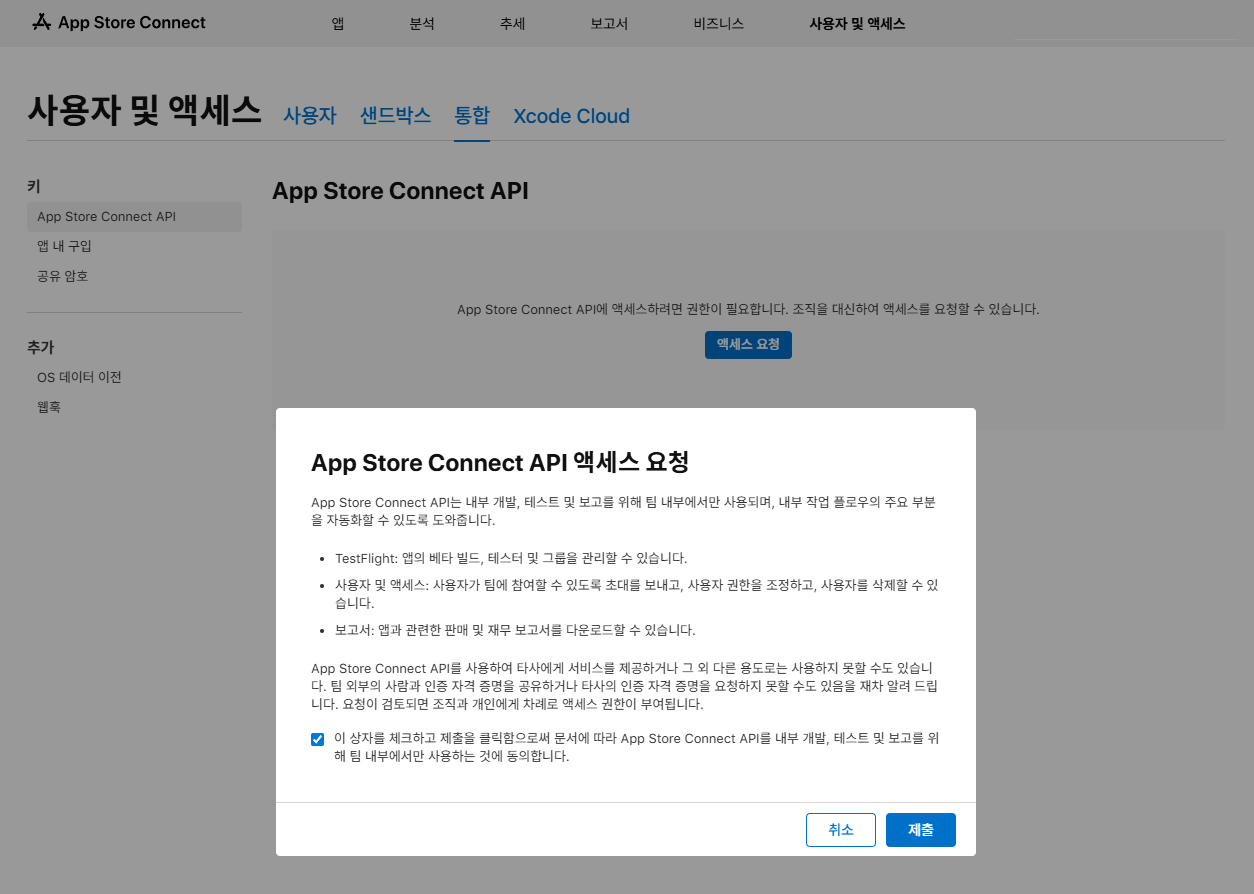
1. 일단 Apple에서 .p8키 파일을 받아야합니다.https://appstoreconnect.apple.com/ https://appstoreconnect.apple.com/ appstoreconnect.apple.com위의 주소로 가서 사용자 및 액세스 > 통합(개인 일 경우 여기로 가야함) > App Store Connect API액세스 요청 보통 보안을 위해 전체 API키 생성보다는 보안상 IAP 전용키를 만드는것이 좋다고합니다.따라서 앱 내 구매 탭으로 이동해 여기서 key을 생성해 줍니다. 파일 다운로드 전 체크!Issuer ID: 액세스 요청 후 화면 상단에 나타나는 값입니다.Key ID: 키를 생성하면 목록에 나타나는 10자리 값입니다.다운로드: .p8 파일은 한 번만 다운로드 가능하..

ASP.NET 2026.03.23

You have an error in your SQL syntax; check the manual that corresponds to your MariaDB server version for the right syntax to use near ''' WHERE orderId = '') AS Value

You have an error in your SQL syntax; check the manual that corresponds to your MariaDB server version for the right syntax to use near ''' WHERE orderId = '') AS Value 위와 같은 오류가 아래의 코드를 했을 때 일어났습니다.FormattableString sql = $"SELECT EXISTS (SELECT 1 FROM {dbTable} WHERE orderId = {productId}) AS Value";int exists = await _dbContext.Database.SqlQuery(sql).SingleAsync(); 이유는 dbTable을 변수로 넣으려고 해서 그..

ASP.NET 2026.03.20

The query uses the 'First'/'FirstOrDefault' operator without 'OrderBy' and filter operators.

warn: Microsoft.EntityFrameworkCore.Query[10103] The query uses the 'First'/'FirstOrDefault' operator without 'OrderBy' and filter operators. This may lead to unpredictable results. 위와 같은 에러가 아래의 코드에서 나왔는데 해결방법은 OrderBy를 넣거나 Single 결과가 나온다고 명시해주는 것 입니다.FormattableString sql = $"SELECT EXISTS (SELECT 1 FROM dbTable WHERE orderId = {productId}) AS Value";int exists = await _dbContext.Databas..

ASP.NET 2026.03.19

OperationException : Failed to initialize localization, could not preload asset tables

[Error]OperationException : Failed to initialize localization, could not preload asset tables Localization을 쓸 때 preload를 적용했는데 자꾸 앱 시작 초반에 위와 같은 에러가 떠서 해결하기 위해서 찾아보니아래와 같은 링크의 해결법을 찾을 수 있었습니다.https://discussions.unity.com/t/locales-preloadoperation-has-not-been-initialized-in-standalone-build/863013/2 - Localization이 초기화 될 때 까지 기다리게 하는 코드입니다.다만 사용하면 초기화 될 때까지 기다리게 하는 것이라 멈춤이 보일 수 있기에 초기 로딩화면에서 ..

Unity 2026.03.13

Google IAP 정보 호출을 제대로 구현했지만 Google에 설정한 정보가 제대로 불려오지 않을 때

일단 정보 호출코드를 제대로 구현한 상태에서 설정정보대로 값이 넘어오지 않을 때 해봐야할 조치를 적습니다. 저의 경우는 분명 ProductMetadatat를 제대로 가져오는데그 안에 값이 제대로 표출 안되고 default값으로만 출력이 되어서 고민하던 중에 해결했던 경험입니다. 구글 플레이 스토어 앱 '데이터 삭제'폰에 있는 구글 플레이 스토어 앱이 예전의 빈 데이터를 기억(캐싱)하고 있어서 업데이트된 불러오는것일 수 있다고 합니다.해결방법: 스마트폰 설정 > 애플리케이션 > Google Play 스토어 > 저장공간 > 데이터 삭제 (캐시 삭제만으로는 부족할 수 있습니다). 그 후 앱을 다시 실행하면 구글 서버에서 최신 데이터를 다시 가져옵니다.

개발 2026.03.12