구글 스토어에서 APK를 빼가서 다른곳에서 사용하여 접속하는 경우가 있었기에 이를 막기위한 방법으로
App Check라는 것이 있습니다
Android, iOS각각 설정하는 방법도 있지만
Firebase를 사용하여 동시에 해결하는 방법도 있습니다.
Unity는 아래의 방법에서 설정하면 됩니다.
https://firebase.google.com/docs/app-check/unity/default-providers?hl=ko&authuser=1
1. Firebase설정
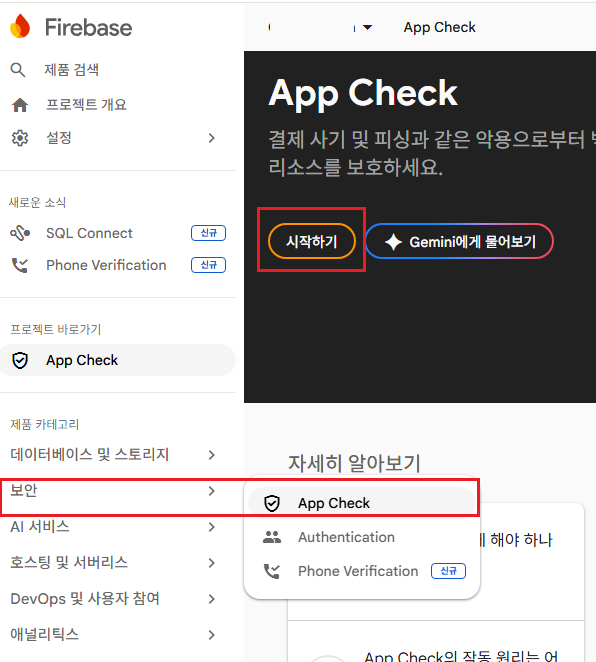
1) Firebase에 해당 프로젝트의 App Check에 들어가줍니다.
(보안 탭 > App Check > 시작하기 클릭)
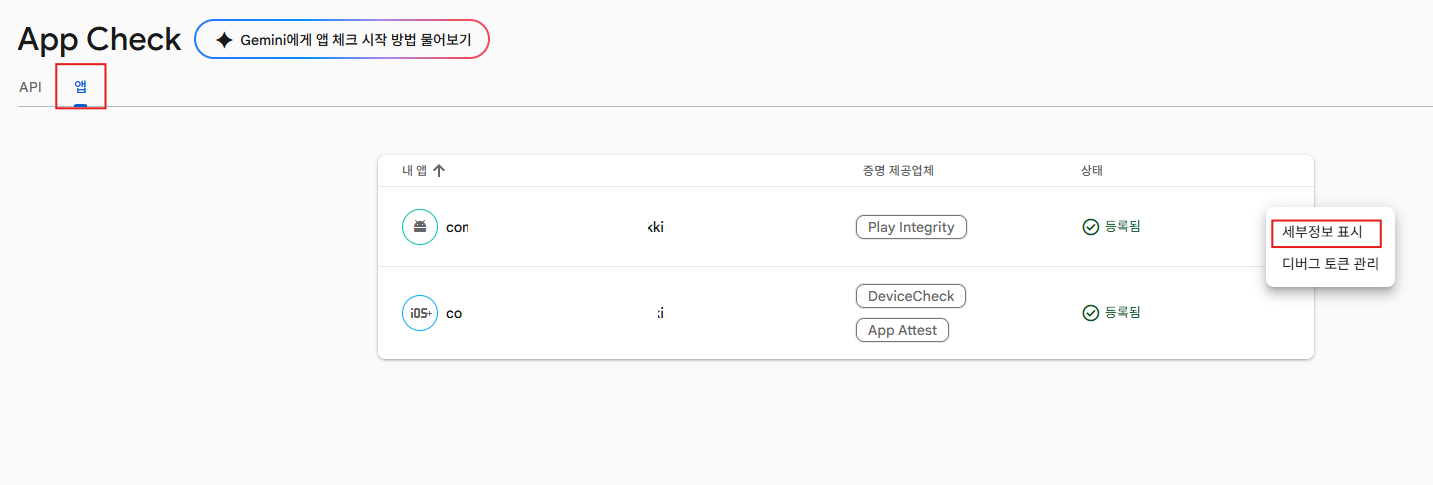
2) 앱탭을 선택한 후 세부정보 표시에서 각 플랫폼에 맞게 설정해줍니다.
Android나 iOS모두 앱 출시를 하시는 과정을 거치면 해당 필요한 부분이 어디인지 쉽게 하실 수 있습니다.
만약 앱이 없다면 프로젝트 개요에서 앱을 추가해 줍니다.

2. Unity 설정
https://firebase.google.com/docs/unity/setup?hl=ko
Unity 프로젝트에 Firebase 추가 | Firebase for Unity
Firebase 프로젝트를 만들고, 앱을 등록하고, Firebase Unity SDK를 추가하는 방법을 비롯하여 Unity 프로젝트에 Firebase를 추가하는 방법을 안내합니다.
firebase.google.com
1) Unity에 firebase_unity_sdk의 FirebaseAppCheck.unitypackage를 넣어줍니다.
https://github.com/firebase/firebase-unity-sdk/releases
2) 해당 SDK를 넣은 후에는 의존성 주입을 해야합니다.
- Android의 경우 Force Resolve

- iOS의 경우 install Cocoapods

3. Unity Firebase App Check 초기화 설정
- 반드시 Firebase설정 전에 App Check를 설정이 되도록합니다.
(아래 사진은 공식에서 해당 부분을 캡쳐해두었습니다)

// Firebase App Check
#if UNITY_EDITOR
                    DebugAppCheckProviderFactory.Instance.SetDebugToken("F11EB149-BD3F-4781-9952-3A334D2DD8BE");
                    FirebaseAppCheck.SetAppCheckProviderFactory(DebugAppCheckProviderFactory.Instance);
#else

#if UNITY_ANDROID
                    FirebaseAppCheck.SetAppCheckProviderFactory(PlayIntegrityProviderFactory.Instance);
#elif UNITY_IOS
                    FirebaseAppCheck.SetAppCheckProviderFactory(AppAttestProviderFactory.Instance);
#endif

#endif

                    DependencyStatus dependencyStatus = await FirebaseApp.CheckAndFixDependenciesAsync()
                        .AsUniTask()
                        .AttachExternalCancellation(destroyCancellationToken);

                    if (dependencyStatus == DependencyStatus.Available)
                    {
                        Auth = FirebaseAuth.DefaultInstance;
                        FirebaseSharedState.SharedInitState = FirebaseSharedState.InitState.Success;

                        // Get AppCheck Token
                        FirebaseSharedState.AppCheckToken = await FetchAppCheckTokenAsync();
                        appCheckResultEvent.Invoke(FirebaseSharedState.AppCheckToken is not null);

                        UnityEngine.Debug.Log($"Firebase Auth initialized successfully.");
                    }
                    else
                    {
                        UnityEngine.Debug.LogError($"Could not resolve Firebase dependencies: {dependencyStatus}");
                        FirebaseSharedState.SharedInitState = FirebaseSharedState.InitState.Failed;
                        return;
                    }

                    // Wait one frame to ensure the Firebase authentication system is fully initialized
                    await UniTask.Yield(destroyCancellationToken);
                    UserAuth();
iOS는 이대로만하면 문제가 되기 때문에 따로 plugin을 수정하여 Firebase초기화 보다 AppCheck가 되도록 설정해야합니다.
(iOS의 native가 unity보다 먼저 실행되어 firebase초기화가 먼저되고 app check 설정이 늦게되어서 app check가 먹통이 되었습니다)
아래는 iOS에서 Firebase 초기화 보다 App Check를 먼저할 수 있게 설정한 스크립트입니다
빌드 때 자동으로 Library를 수정해줍니다.
해당 코드는 firebase_unity_sdk_12.8.0을 사용했을 때 올바르게 작동했습니다.
#if UNITY_EDITOR
using System.IO;
using System.Text.RegularExpressions;
using UnityEditor;
using UnityEditor.Callbacks;
using UnityEngine;

public sealed class IOSFirebaseEarlyInitPatchPostprocess : IOSPostProcessBase
{
    private const string FirebaseInitRelativePath = "Libraries/Plugins/iOS/FirebaseInit.mm";
    private const string GoogleSignInAppControllerRelativePath = "Libraries/Plugins/iOS/GoogleSignIn/GoogleSignInAppController.mm";
    private const int FirebasePatchPostProcessOrder = PostProcessOrder + 1;

    private static readonly Regex FirebaseImportRegex = new Regex(
        @"^\s*#import <Firebase\.h>\r?\n",
        RegexOptions.Multiline | RegexOptions.Compiled);

    private static readonly Regex FirebaseForceInitRegex = new Regex(
        @"\r?\n\+ \(void\)load\s*\r?\n\{\r?\n\s*if \(\[FIRApp defaultApp\] == nil\)\r?\n\s*\{\r?\n\s*\[FIRApp configure\];\r?\n\s*NSLog\(@""Firebase configured \(force init\)""\);\r?\n\s*\}\r?\n\}\r?\n",
        RegexOptions.Compiled);

    private static readonly Regex GoogleSignInForceInitRegex = new Regex(
        @"\r?\n\s*if \(\[FIRApp defaultApp\] == nil\) \{\r?\n\s*\[FIRApp configure\];\r?\n\s*\}\r?\n",
        RegexOptions.Compiled);

    [PostProcessBuild(FirebasePatchPostProcessOrder)]
    public static void OnPostprocessBuild(BuildTarget target, string pathToBuiltProject)
    {
        if (!IsIOSBuild(target)) { return; }

        PatchFirebaseInit(pathToBuiltProject);
        PatchGoogleSignInAppController(pathToBuiltProject);
    }

    private static void PatchFirebaseInit(string pathToBuiltProject)
    {
        string filePath = GetBuildFilePath(pathToBuiltProject, FirebaseInitRelativePath);
        string original = ReadRequiredFile(filePath);
        string patched = FirebaseImportRegex.Replace(original, string.Empty);
        patched = FirebaseForceInitRegex.Replace(patched, "\n");

        WriteIfChanged(filePath, original, patched, "FirebaseInit.mm");
    }

    private static void PatchGoogleSignInAppController(string pathToBuiltProject)
    {
        string filePath = GetBuildFilePath(pathToBuiltProject, GoogleSignInAppControllerRelativePath);
        string original = ReadRequiredFile(filePath);
        string patched = FirebaseImportRegex.Replace(original, string.Empty);
        patched = GoogleSignInForceInitRegex.Replace(patched, "\n");

        WriteIfChanged(filePath, original, patched, "GoogleSignInAppController.mm");
    }

    private static string ReadRequiredFile(string filePath)
    {
        if (!File.Exists(filePath))
        {
            throw new FileNotFoundException($"Missing iOS plugin file to patch: {filePath}", filePath);
        }

        return File.ReadAllText(filePath);
    }

    private static void WriteIfChanged(string filePath, string original, string patched, string displayName)
    {
        if (patched == original)
        {
            Debug.Log($"[iOS Firebase Patch] No early-init patch needed for {displayName}.");
            return;
        }

        File.WriteAllText(filePath, patched);
        Debug.Log($"[iOS Firebase Patch] Patched {displayName} to remove early FIRApp.configure().");
    }
}
#endif
그리고 iOS는 Firebase Console의 앱에서 설정한 DeviceCheck또는 App Attest는 골라서 사용하면 됩니다.
(※ App Attest는 Apple Xcode의 Signing & Capabilities의 Capability에서 App Attest를 넣어줘야 한다고 합니다.)
DeviceCheck의 경우
FirebaseAppCheck.SetAppCheckProviderFactory(DeviceCheckProviderFactory.Instance);
App Attest의 경우
FirebaseAppCheck.SetAppCheckProviderFactory(AppAttestProviderFactory.Instance);
4. Unity App Check 토큰 가져오기
App Check로 인증이 제대로 됐는지 토큰 가져오기
(백엔드 서버에서 검증을 위해 가져옵니다)
https://firebase.google.com/docs/app-check/unity/custom-resource?hl=ko
// 공식 문서 버전
void CallApiExample() {
    FirebaseAppCheck.DefaultInstance.GetAppCheckToken(false).
      ContinueWithOnMainThread(task => {
        if (!task.IsFaulted) {
            // Got a valid App Check token. Include it in your own http calls.
            string appCheckToken = task.Result.Token;
        }
    });
}


// UniTask 버전
private async UniTask<string> FetchAppCheckTokenAsync(bool forceRefresh = true)
{
    try
    {
        AppCheckToken token = await FirebaseAppCheck.DefaultInstance
            .GetAppCheckTokenAsync(forceRefresh)
            .AsUniTask()
            .AttachExternalCancellation(destroyCancellationToken);
        return token.Token;
    }
    catch (Exception e)
    {
        UnityEngine.Debug.LogError($"App Check failed: {e.Message}");
        return null;
    }
}
5. 서버에서 토큰 검증
서버에서 토큰을 가지고 검증해 줍니다.
https://firebase.google.com/docs/app-check/custom-resource-backend?hl=ko#node.js
커스텀 백엔드에서 앱 체크 토큰 확인 | Firebase App Check
Google 외 백엔드 리소스를 보호하기 위해 커스텀 백엔드에서 앱 체크 토큰을 확인하는 방법을 안내합니다.
firebase.google.com
아래의 예시는 ASP.NET서버 사용 했을 때입니다.
(Logger설정, IHttpClientFactory설정, appsetting.json에 값 넣기등은 직접 하셔야합니다)
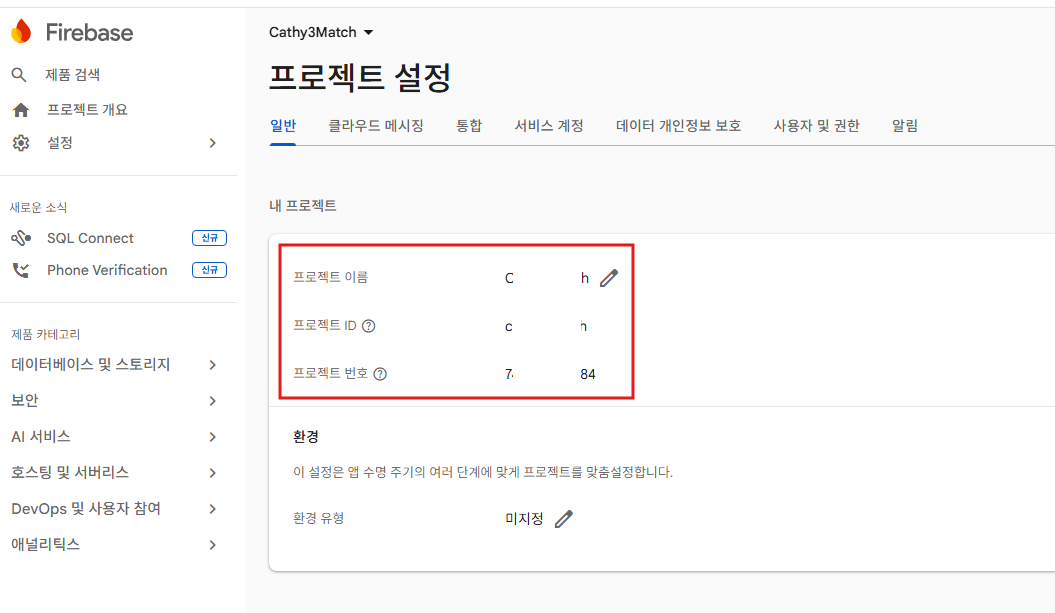
projectNumber, projectId는 firebase console에 있습니다.
VerifyAsync에서 검증 결과를 반환해 줍니다.
using System.IdentityModel.Tokens.Jwt;
using Microsoft.IdentityModel.Tokens;

public class AppCheckVerification
{
    private static ILogger<AppCheckVerification> _logger = null!;
    private static IHttpClientFactory _httpClientFactory = null!;
    private static string _validIssuer = null!;
    private const string JwksUrl = "https://firebaseappcheck.googleapis.com/v1/jwks";

    private static string[] _validAudiences = null!;

    public static void Initialize(ILogger<AppCheckVerification> logger,
        string projectId, string projectNumber, IHttpClientFactory httpClientFactory)
    {
        _logger = logger;
        _httpClientFactory = httpClientFactory;

        _validIssuer = $"https://firebaseappcheck.googleapis.com/{projectNumber}";
        _validAudiences = new[] { $"projects/{projectNumber}", $"projects/{projectId}" };

        _logger.LogInformation("AppCheck Verification initialized successfully.");
    }

    public static async Task<bool> VerifyAsync(string? appCheckToken)
    {
        if (string.IsNullOrEmpty(appCheckToken)) return false;

        try
        {
            // Debug: Uncomment to inspect token claims (aud, iss) when troubleshooting validation failures
            // JwtSecurityTokenHandler debugHandler = new JwtSecurityTokenHandler();
            // JwtSecurityToken jwtToken = debugHandler.ReadJwtToken(appCheckToken);
            // _logger.LogInformation("Audiences: {aud}", string.Join(", ", jwtToken.Audiences));
            // _logger.LogInformation("Issuer: {iss}", jwtToken.Issuer);

            HttpClient client = _httpClientFactory.CreateClient();
            JsonWebKeySet? jwks = await client.GetFromJsonAsync<JsonWebKeySet>(JwksUrl);

            JwtSecurityTokenHandler handler = new JwtSecurityTokenHandler();
            handler.ValidateToken(appCheckToken, new TokenValidationParameters
            {
                ValidateIssuer = true,
                ValidIssuer = _validIssuer,
                ValidateAudience = true,
                ValidAudiences = _validAudiences,
                ValidateLifetime = true,
                IssuerSigningKeys = jwks!.Keys,
            }, out _);

            _logger.LogInformation("AppCheck token verified successfully.");
            return true;
        }
        catch (SecurityTokenException ex)
        {
            _logger.LogError(ex, "AppCheck token validation failed.");
            return false;
        }
        catch (Exception ex)
        {
            _logger.LogError(ex, "Unexpected error during AppCheck token verification.");
            return false;
        }
    }
}
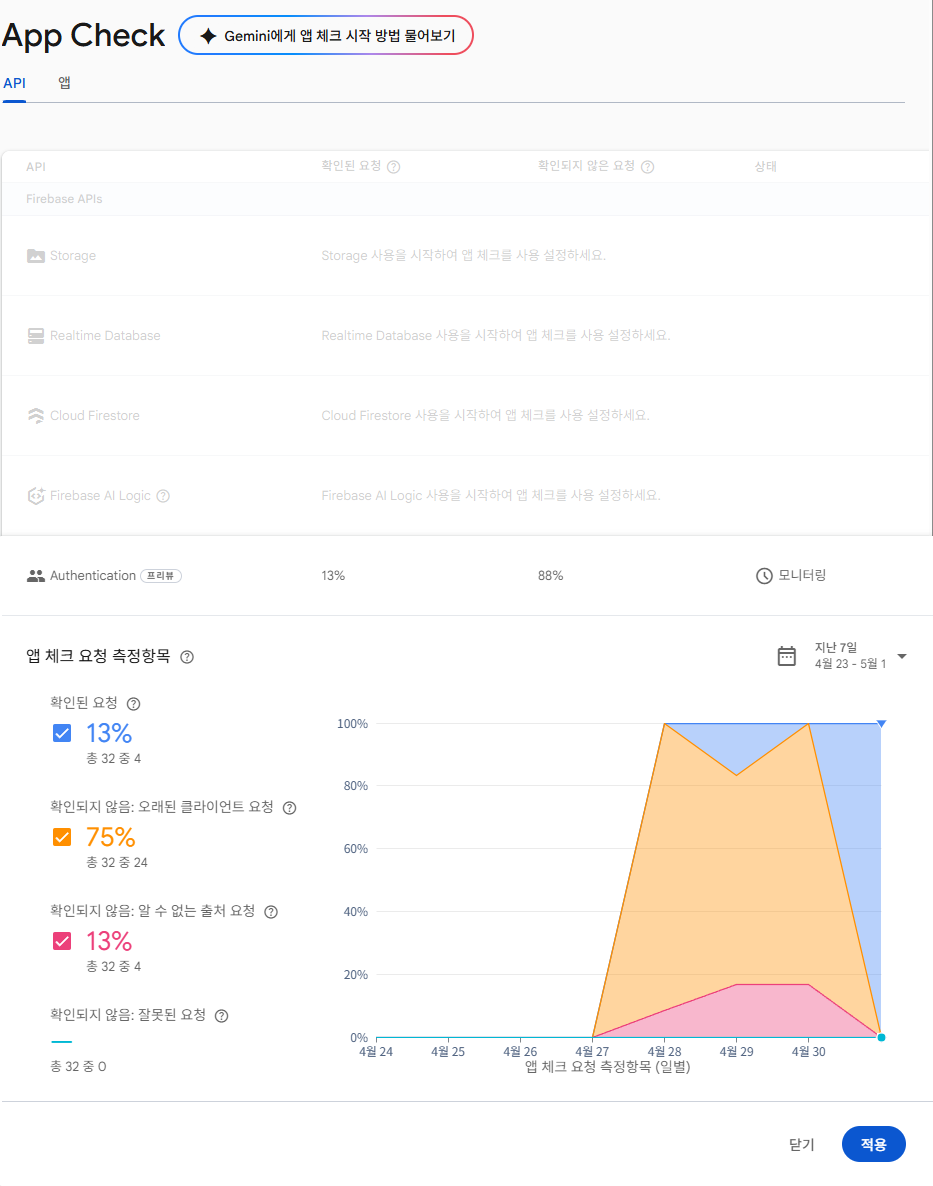
6. Firebase Authentication(파이어베이스 로그인 인증)에 App Check 적용 (적용 클릭 시 App Check 강제함)
- authentication 사용하기 설정 후
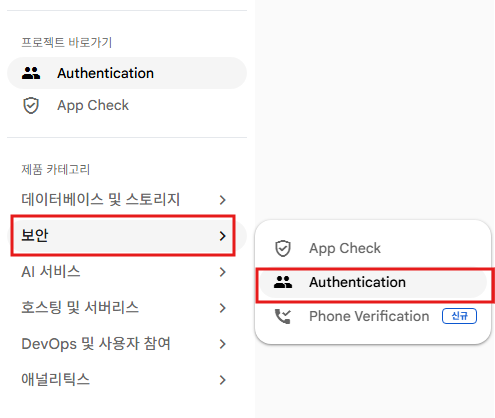
- 실제 적용할 때는 Firebase Console에서 Authentication에서 적용을 누르면 Firebase Login 인증에 AppCheck를 강제합니다.
'Unity' 카테고리의 다른 글
| Unity AR World와 3D World 같이 쓸 때 주의사항 (0) | 2026.04.25 |
|---|---|
| OperationException : Failed to initialize localization, could not preload asset tables (0) | 2026.03.13 |
| Unity IAP Codeless 없이 수동 IAPManager 작성 (0) | 2026.03.09 |
| Unity Stove PCSDK3 연동과 Rank연동 후기 (0) | 2026.03.08 |
| Unity Codeless IAP 사용 때 소비아이템 자동 구매 확정 문제 해결 (0) | 2026.03.05 |