1. GoogleCloud의 서비스 계정으로 들어가 줍니다.
https://console.cloud.google.com/iam-admin/serviceaccounts
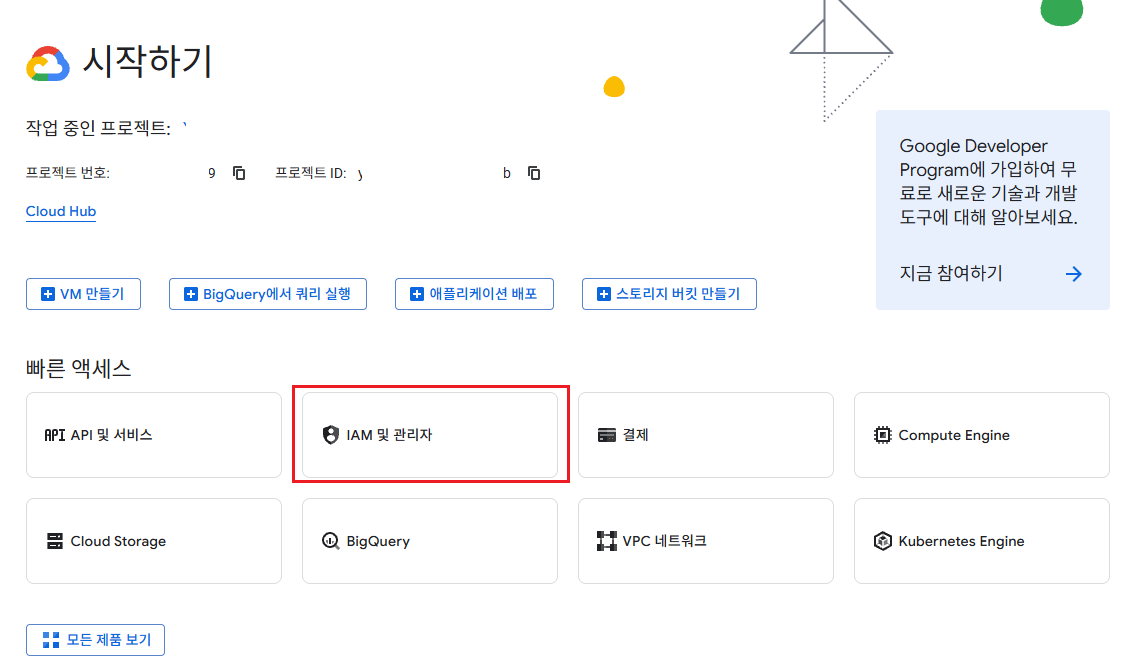
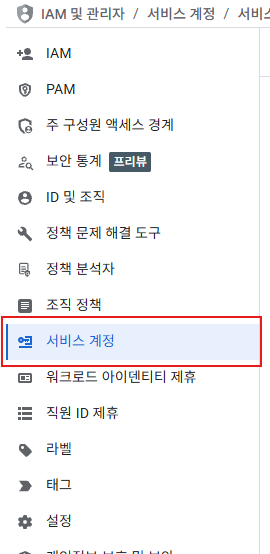
2. 서비스 계정을 만들어줍니다.
1) 서비스 계정 만들기 클릭

2) 서비스 계정 이름 작성

3) GCP(Google Cloud Platform)에서 권한 설정은 따로 필요없다고 합니다.
하지만 Google Play Console에서 금융 데이터 권한이 꼭 필요하다고 합니다
- 재무 데이터 보기, 주문 및 취소 설문조사 응답 관리 (체크 필수)
- 주문 및 구독 관리 (체크 필수)
만약 넣는다고 하면 프로젝트 > 뷰어(Viewer) 권한(단순 조회 권한)정도만 넣으면 되다고 하네요
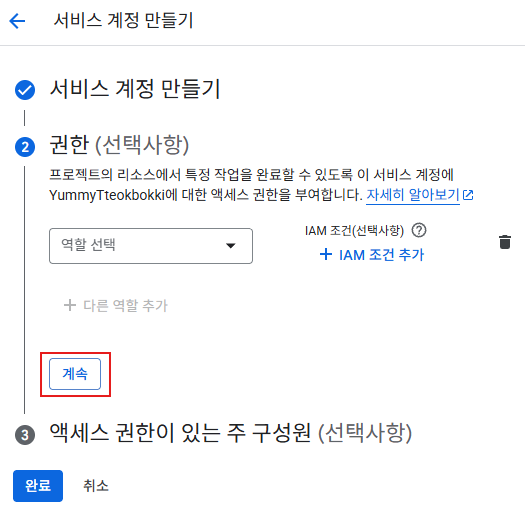
4) 액세스 권한이 있는 주 구성원
여기는 프로젝트에서 소유자 외에 이 서비스 계정 관리권을 넘길 구성원을 넣어주시면 됩니다.
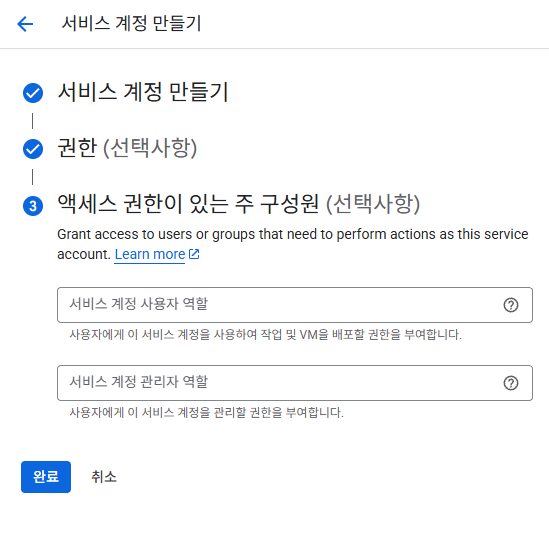
완료 클릭
3. 키 추가하기
1) 생성된 키를 선택
(이메일 부분을 클릭하시면 됩니다)

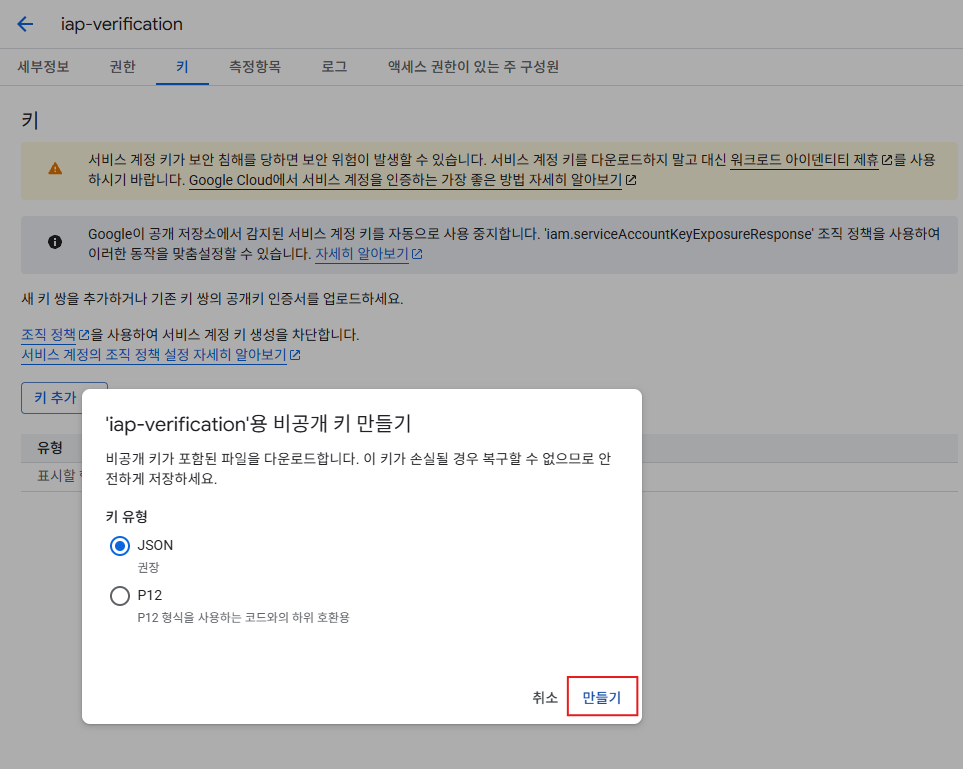
2) 키 탭으로가서 키 추가로 새키 만들기를 해줍니다.

3) JSON 유형으로 키 만들기
(비공개 키가 포함되었기 때문에 유출해서도 안되며 손실되면 복구도 불가능하다고 하네요)
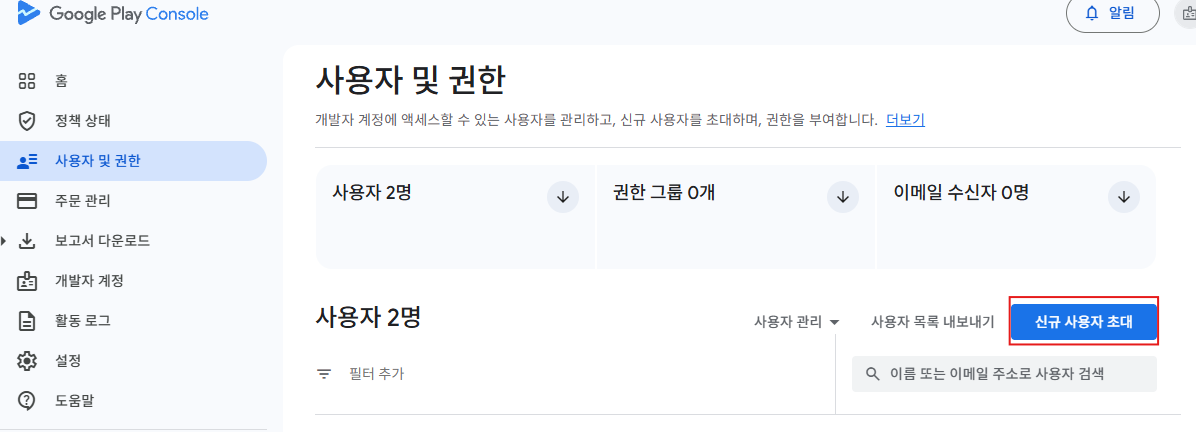
4. 구글 플레이 콘솔의 사용자 및 권한에 위에 만든 서비스 계정을 추가하면서 권한을 부여합니다.
- 재무 데이터 보기, 주문 및 취소 설문조사 응답 관리 (체크 필수)
- 주문 및 구독 관리 (체크 필수)
1) 신규 사용자 초대
2) 앱권한에 애플리케이션 추가

3) 권한 부여
재무 데이터 부분에 체크해줍니다.
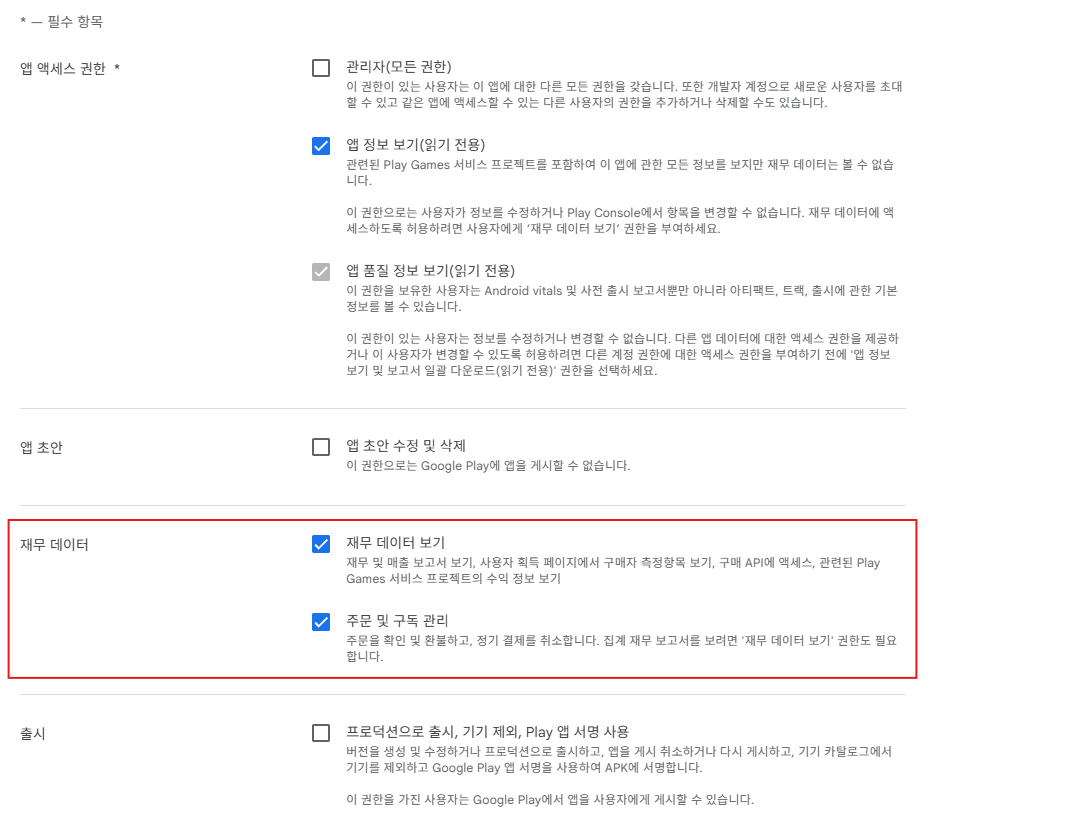
체크가 끝났으면 하단의 적용을 눌러줍니다.
5. 서버에 검증로직 작성
1) Google.Apis.AndroidPublisher.v3 패키지를 받아줍니다.
(.Net에 관련되 package 목록은 https://github.com/googleapis/google-api-dotnet-client 여기서 볼 수 있습니다)
# dotnet 9버전을 사용중 입니다.

# AndroidPublisher.v3 패키지 설치
$ dotnet add package Google.Apis.AndroidPublisher.v3

# 원하는 버전 받기
$ dotnet add package Google.Apis.AndroidPublisher.v3 --version 1.73.0.4052


# 설치 확인 (list에 설치 되었는지 확인)
dotnet list package


# project.csproj파일에서도 확인 가능합니다.
<ItemGroup>
  <PackageReference Include="Google.Apis.AndroidPublisher.v3" Version="1.73.0.4052" />
</ItemGroup>
2) 서비스 계정 생성 때 만든 생성 키(json 유형)를 project에 넣어줍니다.
(중요한 키니까 git에도 올리지말고 배포 때도 수동으로 넣어주시길 바랍니다.
위치는 각자 프로젝트에 맞게 원하는 위치에 넣습니다.
나중에 경로설정만 제대로 하면 됩니다.)
3) 서버 검증 로직
(반드시 OrderId를 DB에 넣으시고 중복인지 아닌지 체크를 하셔야합니다.
구글에 성공이 여러번 반환 되거나 할 수 있다고 하네요.
그리고 실제 줬는지 나중에 영수증 체크하는 영수증 용도로 쓸 수 있습니다.
저의 경우는 여기서 검증만하고 이후 결과값에서 따로 중복체크를 했습니다.)
(또한, 소비, 비소비 아이템에 따른 후속 처리 및 구독일 때에 token처리 및 후속처리도 따로 해주어야하는걸 확인해주세요)
- GoogleIapVerification.cs
(PackageName은 Android 앱과 맞추고 ApplicationName은 서버를 구별할 수 있게만 하는거라 원하는 대로 쓰세요)
using Google.Apis.AndroidPublisher.v3;
using Google.Apis.AndroidPublisher.v3.Data;
using Google.Apis.Auth.OAuth2;
using Google.Apis.Services;

namespace EatLiveStream.Configurations;

public class GoogleIapVerification
{
    private static AndroidPublisherService _service = null!;
    private const string PackageName = "com.Company.PackageName";

    /// <summary>
    /// Initialize AndroidPublisherService using the service account JSON key path
    /// </summary>
    public static void Initialize(string serviceConfigPath)
    {
        try
        {
            /*
             * OLD VERSION (Deprecated)
             * GoogleCredential.FromFile() works but is marked as Obsolete.
             */
            // GoogleCredential credential;
            // using (var stream = new FileStream(_serviceConfigPath, FileMode.Open, FileAccess.Read))
            // {
            //     credential = GoogleCredential.FromStream(stream)
            //         .CreateScoped(AndroidPublisherService.Scope.Androidpublisher);
            // }

            /*
             * LATEST VERSION (Recommended)
             * Use CredentialFactory to load ServiceAccountCredential
             * and convert it to GoogleCredential.
             */
            GoogleCredential credential =
                CredentialFactory.FromFile<ServiceAccountCredential>(serviceConfigPath).ToGoogleCredential();

            _service = new AndroidPublisherService(new BaseClientService.Initializer
            {
                HttpClientInitializer = credential,
                ApplicationName = "Package-Server"
            });

            Console.WriteLine("Google IAP SDK initialized successfully.");
        }
        catch (Exception ex)
        {
            Console.Error.WriteLine($"Error initializing Google IAP SDK: {ex.Message}");
            // Appropriate logging or exception handling is required upon initialization failure.
        }
    }

    /// <summary>
    /// Verify products purchase token
    /// </summary>
    public static async Task<(bool, string)> VerifyProductsPurchaseAsync(string productId, string purchaseToken)
    {
        try
        {
            if (_service is null)
            {
                throw new InvalidOperationException("GoogleIapService has not been initialized. Call Initialize first.");
            }

            PurchasesResource.ProductsResource.GetRequest request
                = _service.Purchases.Products.Get(PackageName, productId, purchaseToken);
            ProductPurchase result = await request.ExecuteAsync();

            switch (result.PurchaseState)
            {
                case 0: // Purchase
                    // [Important] Check for duplicate result.OrderId in DB before granting item
                    Console.WriteLine($"success {result.OrderId}");
                    return (true, result.OrderId!);
                case 1: // Cancel
                    Console.WriteLine($"failed purchase state is {result.PurchaseState}");
                    return (false, null!);
                case 2: // Pending
                    Console.WriteLine($"pending purchase state is {result.PurchaseState}");
                    return (false, null!);
                default:
                    return (false, null!);
            }
        }
        catch (Google.GoogleApiException ex)
        {
            // Detailed exception handling possible when token is invalid (404), etc.
            Console.WriteLine($"error: Google API error - {ex.Message}");
            return (false, null!);
        }
        catch (Exception ex)
        {
            Console.WriteLine($"error: {ex.Message}");
            return (false, null!);
        }
    }
}
추가로 서버 DB에 추가한 후 소비, 비소비 후속처리도 해주어야합니다.
위에 작성한 GoogleIapVerification.cs 하위에 추가로 넣었습니다.
    /// <summary>
    /// Consume purchased products
    /// </summary>
    public static async Task<bool> ConsumeProductsAsync(string productId, string purchaseToken)
    {
        try
        {
            if (_service is null)
            {
                throw new InvalidOperationException("GoogleIapService has not been initialized. Call Initialize first.");
            }

            // Mark the consumable product as used in Google Play system
            await _service.Purchases.Products.Consume(PackageName, productId, purchaseToken).ExecuteAsync();

            return true;
        }
        catch (Google.GoogleApiException ex) when (ex.HttpStatusCode == System.Net.HttpStatusCode.BadRequest)
        {
            // If the error indicates "not owned," it often means the token was already consumed
            // in a previous attempt. We treat this as a success to prevent unnecessary rollbacks.
            bool isAlreadyConsumed = ex.Message.Contains("not owned by the user");

            // Log the event with a tag to distinguish it from critical errors
            Console.WriteLine($"IAP Consume Error Product: {productId}, AlreadyConsumed: {isAlreadyConsumed}, RawError: {ex.Message}");

            return isAlreadyConsumed;
        }
        catch (Exception ex)
        {
            // Log the error if the token is already consumed or invalid
            Console.WriteLine($"IAP Consume Error Product: {ex.Message}");
            return false;
        }
    }

    /// <summary>
    /// Acknowledge Non-Consume purchased products
    /// </summary>
    public static async Task<bool> AcknowledgeNonConsumeAsync(string productId, string purchaseToken)
    {
        try
        {
            if (_service is null)
            {
                throw new InvalidOperationException("GoogleIapService has not been initialized. Call Initialize first.");
            }

            // Create an empty request body for the Product acknowledge API
            ProductPurchasesAcknowledgeRequest content = new ProductPurchasesAcknowledgeRequest();

            // Non-consumables require an Acknowledge request
            await _service.Purchases.Products.Acknowledge
                (content, PackageName, productId, purchaseToken).ExecuteAsync();

            return true;
        }
        catch (Google.GoogleApiException ex) when (ex.HttpStatusCode == System.Net.HttpStatusCode.BadRequest)
        {
            // If the error indicates "not owned," it often means the token was already consumed
            // in a previous attempt. We treat this as a success to prevent unnecessary rollbacks.
            bool isAlreadyFinalized = ex.Message.Contains("not owned by the user") ||
                                      ex.Message.Contains("already been acknowledged");

            // Log the event with a tag to distinguish it from critical errors
            Console.WriteLine($"IAP Consume Error Product: {productId}, AlreadyFinalized: {isAlreadyFinalized}, RawError: {ex.Message}");

            return isAlreadyFinalized;
        }
        catch (Exception ex)
        {
            // Log the error if the token is already consumed or invalid
            Console.WriteLine($"IAP Acknowledge Error Product: {ex.Message}");
            return false;
        }
    }
그리고 구독 아이템일 때의 확인과 후속처리입니다.
위에 작성한 GoogleIapVerification.cs 하위에 추가로 넣었습니다.
(아직 스크립트만 작성하고 구독아이템이 테스트를 해본적 없기에 참고만 해주세요)
    /// <summary>
    /// Verify Subscriptionsv2 purchase token
    /// </summary>
    public static async Task<(bool, string)> VerifySubscriptionsv2PurchaseAsync(string productId, string purchaseToken)
    {
        try
        {
            if (_service is null)
            {
                throw new InvalidOperationException("GoogleIapService has not been initialized. Call Initialize first.");
            }

            PurchasesResource.Subscriptionsv2Resource.GetRequest request
                = _service.Purchases.Subscriptionsv2.Get(PackageName, purchaseToken);
            SubscriptionPurchaseV2 result = await request.ExecuteAsync();

            // Ensure the subscription includes the requested productId in its line items
            bool isProductMatched = result.LineItems.Any(item => item.ProductId == productId);
            if (!isProductMatched)
            {
                return (false, "PRODUCT_ID_MISMATCH");
            }

            string state = result.SubscriptionState;

            if (state == "SUBSCRIPTION_STATE_ACTIVE")
            {
                // The subscription is active and the user is entitled to the service
                return (true, state);
            }
            else if (state == "SUBSCRIPTION_STATE_IN_GRACE_PERIOD")
            {
                // Payment failed, but the user is in a grace period (benefits can still be provided)
                return (true, state);
            }
            else if (state == "SUBSCRIPTION_STATE_EXPIRED")
            {
                // The subscription has expired
                return (false, state);
            }
            else if (state == "SUBSCRIPTION_STATE_PENDING")
            {
                // The initial payment is still pending (e.g., delayed payment methods)
                return (false, state);
            }
            else
            {
                // Other states (e.g., Canceled, On hold)
                return (false, state);
            }
        }
        catch (Google.GoogleApiException ex)
        {
            // Detailed exception handling possible when token is invalid (404), etc.
            Console.WriteLine($"error: Google API error - {ex.Message}");
            return (false, null!);
        }
        catch (Exception ex)
        {
            Console.WriteLine($"error: {ex.Message}");
            return (false, null!);
        }
    }

    /// <summary>
    /// Check purchased Subscriptionsv2
    /// </summary>
    public static async Task<bool> CheckSubscriptionsv2Async(string purchaseToken)
    {
        try
        {
            if (_service is null)
            {
                throw new InvalidOperationException("GoogleIapService has not been initialized. Call Initialize first.");
            }

            PurchasesResource.Subscriptionsv2Resource.GetRequest request =
                _service.Purchases.Subscriptionsv2.Get(PackageName, purchaseToken);
            SubscriptionPurchaseV2 result = await request.ExecuteAsync();

            // Validate the Subscription State
            // We only grant benefits if the state is "ACTIVE" or "IN_GRACE_PERIOD".
            // "IN_GRACE_PERIOD" means a payment issue occurred, but the user is still allowed
            // to access the service temporarily while Google retries the payment.
            if (result.SubscriptionState == "SUBSCRIPTION_STATE_ACTIVE" ||
                result.SubscriptionState == "SUBSCRIPTION_STATE_IN_GRACE_PERIOD")
            {
                Console.WriteLine($"Subscription Active subscription verified. Latest OrderId: {result.LatestOrderId}");
                return true;
            }

            // Handle cases where the subscription is expired, canceled, or on hold.
            // In these states (e.g., SUBSCRIPTION_STATE_EXPIRED), access to premium features should be revoked.
            Console.WriteLine($"Subscription Inactive or expired state: {result.SubscriptionState}");
            return false;
        }
        catch (Exception ex)
        {
            Console.WriteLine($"Subscription Error: {ex.Message}");
            return false;
        }
    }

    /// <summary>
    /// Acknowledges a subscription purchase (Subscription Acknowledgment).
    /// </summary>
    public static async Task<bool> AcknowledgeSubscriptionsv2Async(string subscriptionId, string purchaseToken)
    {
        try
        {
            if (_service is null)
            {
                throw new InvalidOperationException("GoogleIapService has not been initialized. Call Initialize first.");
            }

            // Create an empty request body for the subscription acknowledge API
            SubscriptionPurchasesAcknowledgeRequest content = new SubscriptionPurchasesAcknowledgeRequest();

            // Finalize the subscription purchase in Google Play
            // Note: Subscription Acknowledge is under 'Purchases.Subscriptions'
            await _service.Purchases.Subscriptions.Acknowledge(content, PackageName, subscriptionId, purchaseToken).ExecuteAsync();

            return true;
        }
        catch (Google.GoogleApiException ex) when (ex.HttpStatusCode == System.Net.HttpStatusCode.BadRequest)
        {
            // If the subscription is already acknowledged or not owned, we treat it as a success for idempotency.
            bool isAlreadyFinalized = ex.Message.Contains("not owned by the user") ||
                                      ex.Message.Contains("already been acknowledged");

            Console.WriteLine($"Subscriptions Acknowledge SubId: {subscriptionId}, AlreadyFinalized: {isAlreadyFinalized}, RawError: {ex.Message}");

            return isAlreadyFinalized;
        }
        catch (Exception ex)
        {
            // Log critical errors such as network failure or unauthorized access
            Console.WriteLine($"Subscriptions Acknowledge SubId: {subscriptionId}, Error: {ex.Message}");
            return false;
        }
    }
- GoogleIapVerification.cs를 Program.cs에 적용
var builder = WebApplication.CreateBuilder(args);

// --- IAP SDK Initialized ---
string? iapConfigPath = builder.Configuration["GoogleIap:ServiceAccountPath"];
if (string.IsNullOrEmpty(iapConfigPath))
{
    throw new InvalidOperationException("Google Iap service account path is not configured. Please add 'GoogleIap:ServiceConfigPath' to your configuration.");
}

string absoluteGoogleIapConfigPath = Path.Combine(Directory.GetCurrentDirectory(), iapConfigPath);
try
{
    GoogleIapVerification.Initialize(absoluteGoogleIapConfigPath);
}
catch (Exception ex)
{
    throw new InvalidOperationException($"Failed to initialize Firebase Admin SDK: {ex.Message}", ex);
}
// --- IAP SDK Initialized End ---
- appsettings.json 또는 appsettings.Development.json에 GoogleIap AccountPath등록
# ServiceAccountPath의 googleiap.json는 위에서 받아서 넣어준 json파일입니다.
# json파일의 경로에 맞게 세팅해주셔야합니다.
{
  "GoogleIap": {
    "ServiceAccountPath": "googleiap.json 경로"
  },
  "Logging": {
    "LogLevel": {
      "Default": "Information",
      "Microsoft.AspNetCore": "Warning"
    }
  }
}
6. 클라이언트(Android)에서 productId와 token을 보내어 서버검증을 해봅니다.
(아래는 대략 흐름을 볼 수 있을 정도만 적습니다)
    // 1. Client 요청
    // 예시) IapDto에 넣어 요청
    public class IapDto
    {
        public byte[] playerId { get; set; }
        public string productId { get; set; }
        public string verificationToken { get; set; }
    }
    // 예시) ResponseIapDto에 넣어서 응답
    public class ResponseIapDto
    {
        public byte[] playerId { get; set; }
        public int purchaseState { get; set; }
    }


    // 2. MVC: DAO script 처리만 예시
    public async Task<ResponseIapDto> SaveIAPAsync(IapDto iapDto)
    {
        // 1) 구글 IAP 검증을 해줍니다.
        (bool isVerified, string orderId) = await GoogleIapVerification.VerifyProductsPurchaseAsync
            (iapDto.productId, iapDto.verificationToken);

        if(!isVerified) { return ErrorResponse(iapDto.playerId); }

        // 2) DB에서 orderId가 중복되는지 확인해줍니다.
        // 여기 예시에서는 지급기록 스키마에 orderId도 같이 등록해주는 예시입니다.
        int exists = await _dbContext.Database
            .SqlQuery<int>($"SELECT EXISTS (SELECT 1 FROM save_iap WHERE orderId = {orderId}) AS Value")
            .FirstOrDefaultAsync();

        // 이미 DB에 존재할 경우 구매 후 지급까지 완료 된것
        // ErrorResponse에서 디테일하게 Error State를 나눠도 됩니다.
        if (exists > 0) { return ErrorResponse(iapDto.playerId); }

        // 3) DB에 해야할 작업을 해줍니다(이용자에게 보상 지급)
        // DB입력 예시, 프로젝트에 맞춰서 해주세요
        int affected = await _dbContext.Database.ExecuteSqlInterpolatedAsync(
            @$"INSERT INTO save_iap (
playerId, orderId, now)
VALUES ({iapDto.playerId!}, {orderId}, {TimeUtility.GetKoreaTime().DateTime})");

        // 4) DB입력 성공 시
        if (affected > 0)
        {
            // 구글 플레이 서버 측의 영수증 상태를 최종 확정(Finalize)합니다.
            // - 소모성 상품: 'Consume'을 호출하여 아이템 사용 처리 및 재구매 가능 상태로 변경 합니다.
            // - 비소모성/구독 상품: 'Acknowledge'를 호출하여 자동 환불(Refund)을 방지 합니다.
            // 주의: 서버의 확정 처리와 별개로, 클라이언트(App)에서도 서버 응답을 받은 뒤
            // 반드시 결제 완료 함수(ConfirmPendingPurchase)를 호출하여 대기 상태를 해제해야 합니다.
            if (await GoogleIapVerification.ConsumeProductsAsync
                    (iapDto.productId, iapDto.verificationToken))
            {
                // 5) 후속처리 성공 시 응답 DTO 반환
                return new ResponseIapDto
                {
                    playerId = iapDto.playerId,
                    purchaseState = 0,
                };
            }
        }

        return ErrorResponse(iapDto.playerId!);
    }

    // IAP 실패시 응답 생성 합수
    private ResponseIapDto ErrorResponse(byte[] playerId)
    {
        return new ResponseIapDto   // Error Response
        {
            playerId = playerId,
            purchaseState = 1,  // Error state is 1
        };
    }


    // 3. Client응답 처리
    if(responseIapDto.purchaseState == 0)   // Success state is 0
    {
        ConfirmPendingPurchase();
    }
※ 주의
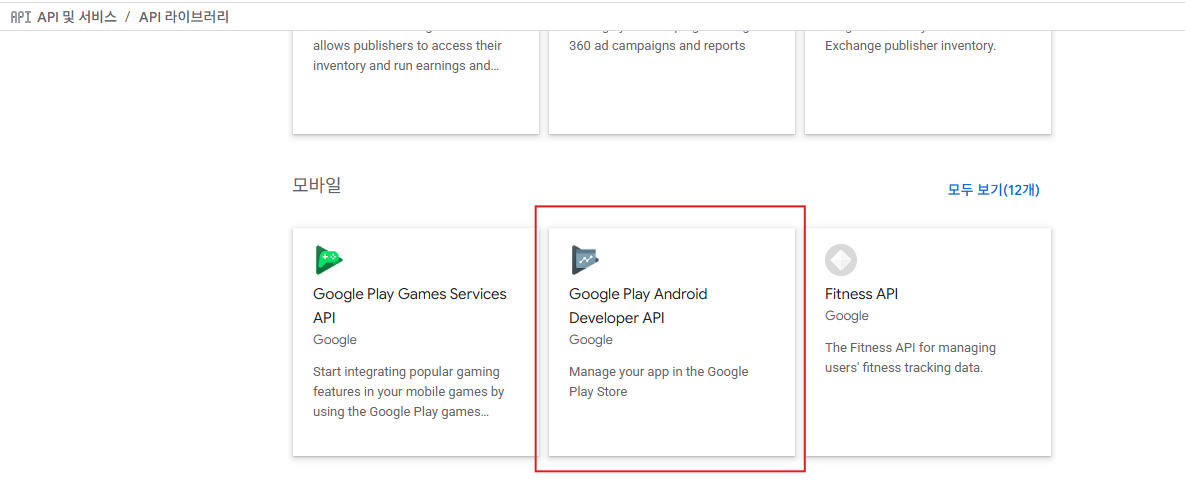
1) error: Google API error - The service androidpublisher has thrown an exception. HttpStatusCode is Forbidden. Google Play Android Developer API has not been used in project 344537407259 before or it is disabled. Enable it by visiting https://console.developers.google.com/apis/api/androidpublisher.googleapis.com/overview then retry. If you enabled this API recently, wait a few minutes for the action to propagate to our systems and retry
Google Play Android Developer API가 활성화 되지 않아서 그렇습니다.
에러에서 준 url링크로 가서 사용을 누르면 해결됩니다.
에러의 링크는 Google Play Android Developer API입니다.

Google Cloud의 API 및 서비스의 라이브러리 클릭 후 모바일의 Google Play Android Developer API로 가서 사용을 눌러도 됩니다.

2) error: Google API error - The service androidpublisher has thrown an exception. HttpStatusCode is BadRequest. The purchase token does not match the product ID.
product ID랑 발급 토큰이 안 맞아서 그렇다고 합니다.
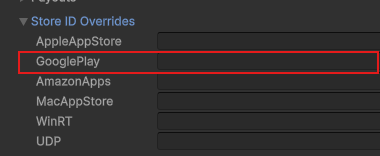
저의 경우 Client가 Unity였는데 IAP Catalog의 Store ID Overrides에 다른 값이 들어있어서 그랬었습니다.
서버 검증의 product ID값이 Client결제 product ID값이 맞는지 확인해보세요!
3) error: The service androidpublisher has thrown an exception. HttpStatusCode is BadRequest. The product purchase is not owned by the user.
테스트 때 뜨던데 이미 구매가 되었기에 그렇다고 합니다.
때문에 DB에서 이미 OrderId가 중복되는지 체크했기에 Consume 체크에서는 예외처리에서 true로 넘기게 했습니다.
위에 ProductsConsumeAsync 함수에서
catch (Google.GoogleApiException ex) when (ex.HttpStatusCode == System.Net.HttpStatusCode.BadRequest)
여기를 참고하시면 됩니다.
    /// <summary>
    /// Consume purchased products
    /// </summary>
    public static async Task<bool> ProductsConsumeAsync(string productId, string purchaseToken)
    {
        try
        {
            if (_service is null)
            {
                throw new InvalidOperationException("GoogleIapService has not been initialized. Call Initialize first.");
            }

            // Mark the consumable product as used in Google Play system
            await _service.Purchases.Products.Consume(PackageName, productId, purchaseToken).ExecuteAsync();

            return true;
        }
        catch (Google.GoogleApiException ex) when (ex.HttpStatusCode == System.Net.HttpStatusCode.BadRequest)
        {
            // If the error indicates "not owned," it often means the token was already consumed
            // in a previous attempt. We treat this as a success to prevent unnecessary rollbacks.
            bool isAlreadyConsumed = ex.Message.Contains("not owned by the user");

            // Log the event with a tag to distinguish it from critical errors
            Console.WriteLine($"IAP Consume Error Product: {productId}, AlreadyConsumed: {isAlreadyConsumed}, RawError: {ex.Message}");

            return isAlreadyConsumed;
        }
        catch (Exception ex)
        {
            // Log the error if the token is already consumed or invalid
            Console.WriteLine($"IAP Consume Error Product: {ex.Message}");
            return false;
        }
    }